

Jury scheduling and assessment software for music and performance departments
The Assessment Platform Built for Jury Day
Replace printed paper assessments, spreadsheet scheduling, and delayed results with one streamlined platform.
“Academicjuries.com solves these issues entirely.”
Scheduling and Registration
Faculty, rooms, and time slots coordinated in one place. Students self-register.
Live Faculty Assessment
Pre-filled digital assessments on any device, so faculty can focus on the student and give feedback in real time.
Results and Export
Generate PDF results in one click and deliver them to administrators, faculty, and students.
Everything Your Music Department Needs
One platform to manage the entire jury assessment lifecycle — from scheduling through results delivery.
Designed for Multiple Departments
Works with one department or ten, each with its own access controls.
Scheduling and Registration
Coordinate jury schedules across rooms and time slots. Students self-register for open sessions, and booked slots are removed from their choices.
Faculty Assessment
Customizable assessment rubrics that faculty complete digitally during performances, with real-time submission.
Results and Reporting
Consolidated assessments, one-click PDF generation, and bundled student and faculty exports. Results reach students without waiting for printed forms.
Student Results Stay on File
A student's registrations and assessments stay available throughout their time at your institution.
Customizable Emails
Send registration confirmations and reminders with your department's own branding and wording, so students recognize and trust them.
What Faculty Say
What Academic Juries has created is the solution to an all-too-frequent challenge encountered in university music schools. For many of us, the difficulty of academic juries lies not in our crafting thoughtful feedback, but in the time required to record it clearly. All too often, faculty are asked to write notes by hand on printed forms or to navigate cumbersome spreadsheets - which, even when well-designed, are rarely suited for live, artistic evaluation.
Academicjuries.com solves these issues entirely. It features an intuitive, beautifully designed interface that is effortless to navigate. Furthermore, it can be fully customized to meet the unique specifications of any department, offering the flexibility to adapt as program needs evolve.
I sincerely hope to use academicjuries.com for semesters to come in support of my students' progress.
All students deserve thorough, actionable guidance, and this platform - specifically created for academic juries empowers any faculty to deliver just that.
How Music Jury Management Works
From setup to sign-off, everything handled in between.
Configure Your Account
Set up departments and venues, and create registration and assessment templates.
Customize Your System
Create email templates, set your branding, and block out lunch and snack breaks in the jury schedule.
Invite Faculty
Add your faculty to the system and assign their roles and departments for the right level of access.
Add and Invite Students
Import your students and send automatic invitations for them to self-register.
Students Register
Students browse available slots, submit repertoire, and confirm their performance time.
Faculty Assess
Faculty complete assessments on any device in real time during jury performances.
Deliver Results
Generate PDFs, notify students, and export records.
Review and Archive
Results stay on file for every student, ready when you need them.
See the Jury Platform in Action
A quick look at the platform faculty and students use every jury day.
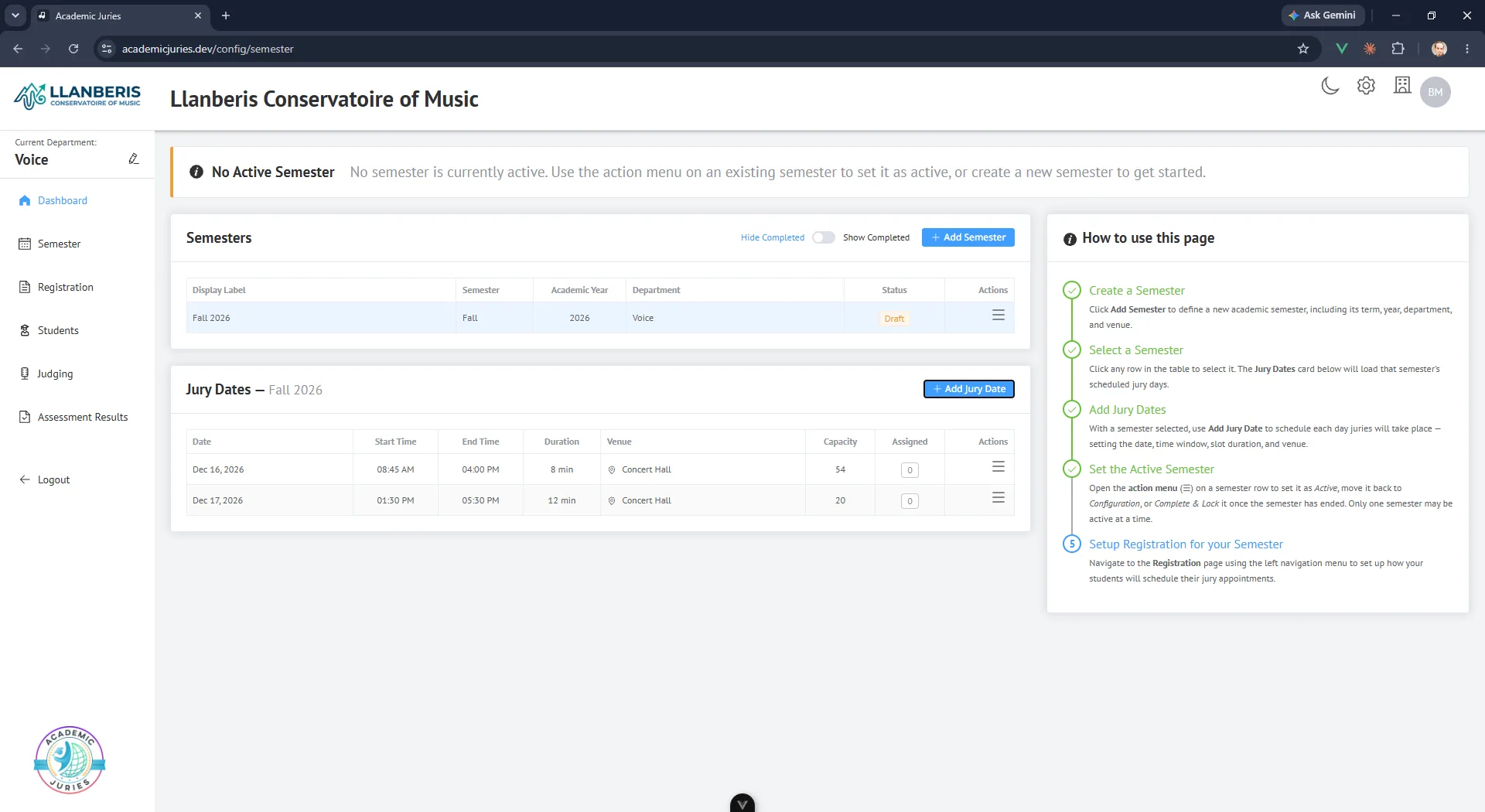 Faculty Dashboard
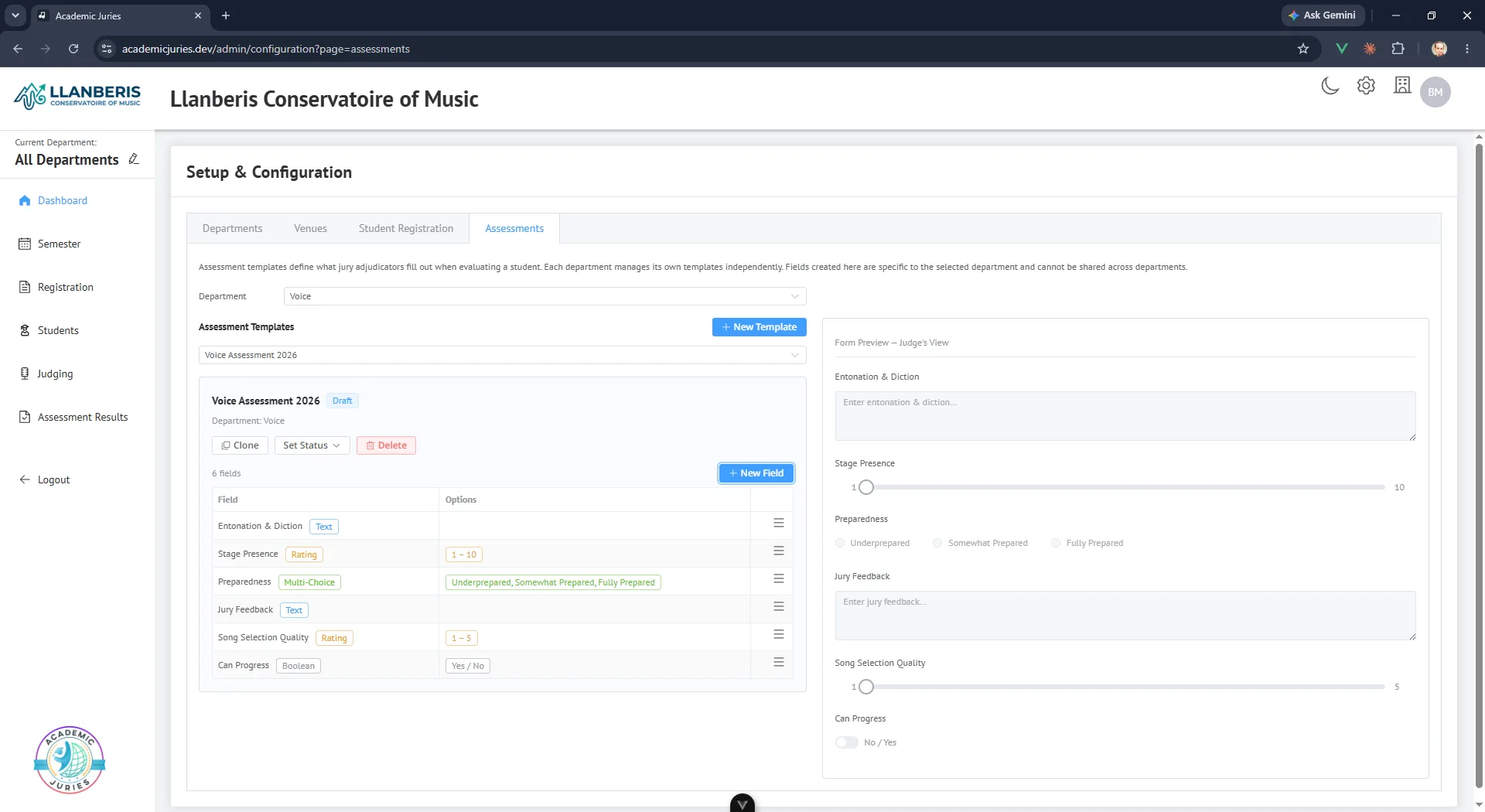 Assessment Rubric
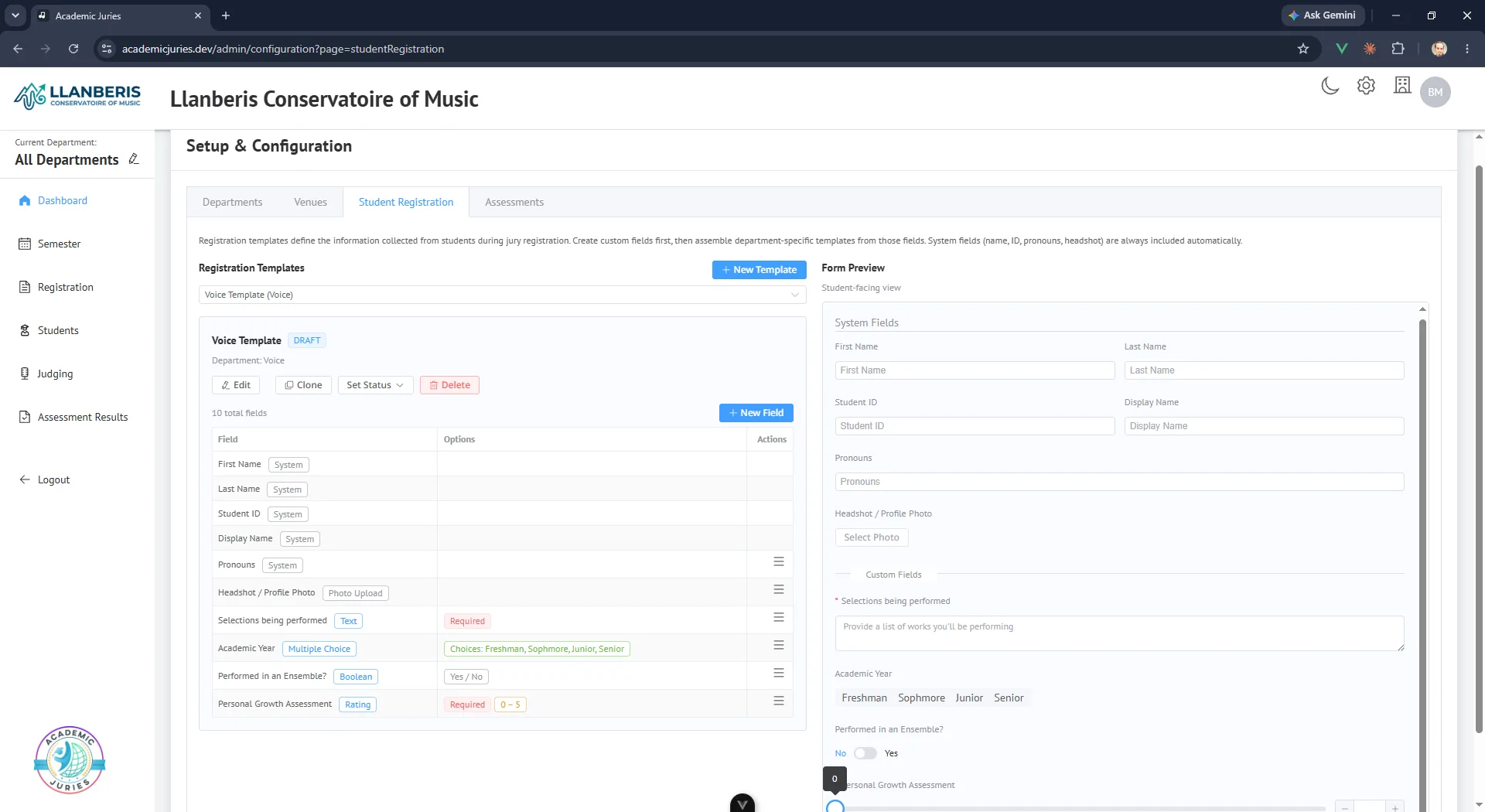 Student Registration
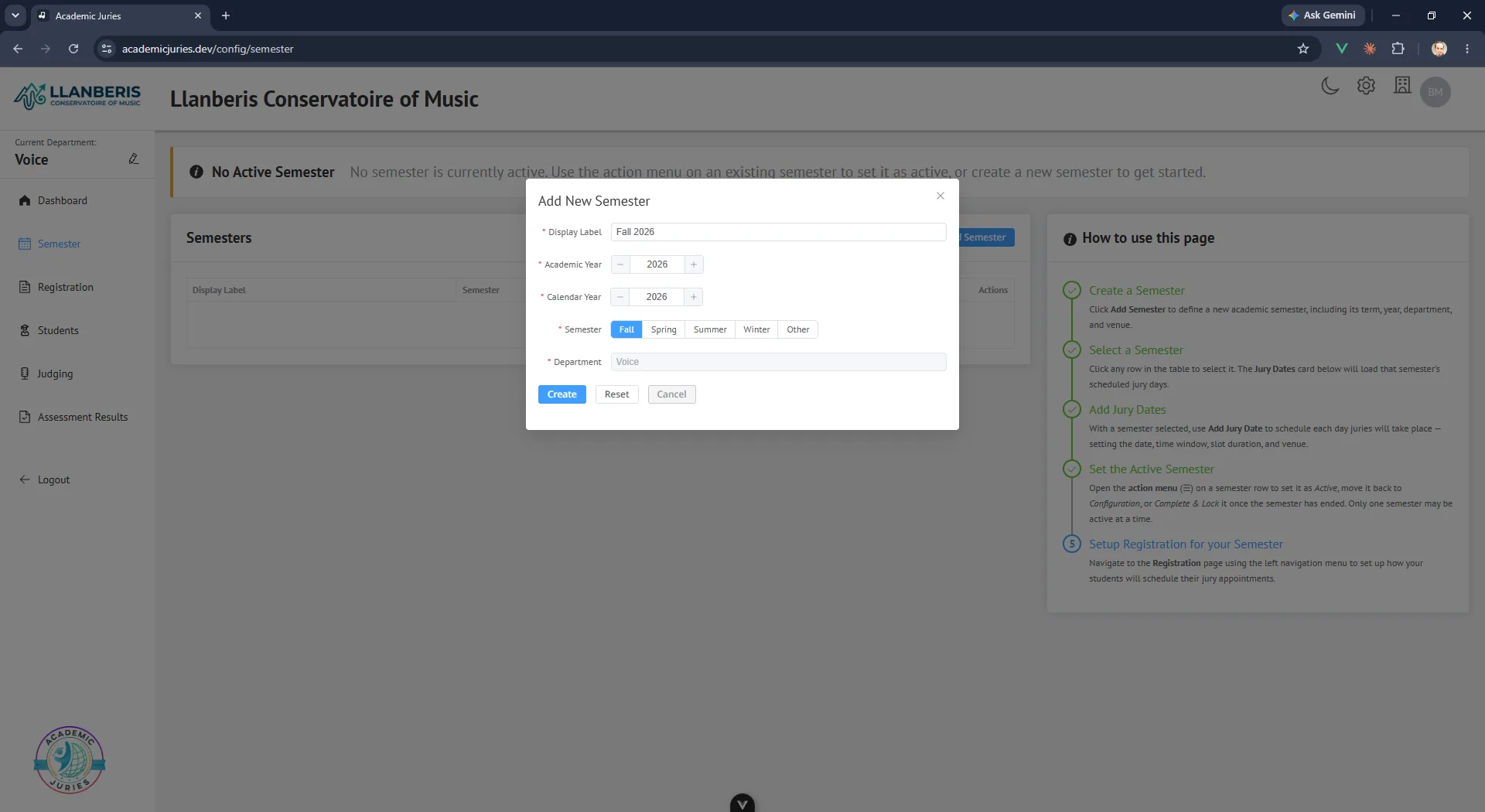 Season Schedule
Music Jury Software Plans and Pricing
Flexible pricing that scales with your institution. All plans include core jury assessment capabilities.
Mozart
$199/semester
For single departments getting started with digital jury assessments.
- 1 area (an instrument or performance area, such as Voice or Piano)
- School-specific branding or institution themes
- Customizable assessment forms
- Dedicated student registration portal
- PDF report generation
- Student email notifications
Beethoven
$649/semester
For growing programs that need advanced tools and automation.
Includes everything in Mozart, plus:
- Up to 5 areas supported
- Bulk PDF exports with automatic email delivery
- Customizable email templates
- Additional areas available for an extra fee
Haydn
$1,299/semester
For departments running juries across many areas.
Includes everything in Beethoven, plus:
- Up to 13 areas supported
- Video conference support
Brahms
Contact
For large institutions and multi-campus deployments.
Includes everything in Haydn, plus:
- Custom subdomains
- 14 or more areas supported
- Dedicated account manager
Full Feature Comparison
| Feature | Mozart | Beethoven | Haydn | Brahms |
|---|---|---|---|---|
| CORE | ||||
| Areas Number of instrument or performance areas you can run juries for. Each area can have its own registration and assessment forms. | 1 area | Up to 5 areas | Up to 13 areas | 14 or more |
| Customizable assessment forms Build and tailor the assessment fields faculty use to evaluate each performance. | ||||
| Student registration portal with email notifications Students sign up for jury slots and get automatic confirmation and reminder emails. | ||||
| PDF assessment generation Generates a printable PDF report of each student's jury results from each faculty member. | ||||
| School-specific branding or institution themes Apply your institution's colors and logo throughout the platform. | ||||
| Customizable scoring rubrics Create advanced, reusable scoring rubrics beyond the standard assessment form. | ||||
| Secure third-party authentication platform Sign-in and account security are handled by Auth0, a dedicated authentication provider. | ||||
| ADVANCED | ||||
| Bulk PDF exports Export and email assessment PDFs in bulk for many students or faculty at once instead of one at a time. | — | |||
| Customizable email templates Customize the email notifications that are sent to students and faculty. | — | |||
| SSO / SAML integration Let faculty and staff sign in using your institution's existing identity provider. | — | — | — | Contact |
| SUPPORT | ||||
| Support channel How you can reach us with questions or issues. | Email, SMS | Email, SMS, video | Customizable | |
| Dedicated account manager A named contact who knows your account and helps with setup and questions. | — | — | — | |
Available Add-Ons
Extend any plan with optional modules. Additional areas are available now; more modules are coming soon.
Additional Area License
Starting at $150/semester
Extend Academic Juries into another area. Multiples can be added to an existing package subscription to provide jury management for the entire organization.
Room and Venue Scheduling Coming soon
Pricing announced at launch
Manage practice rooms, recital halls, and performance venues from one calendar. Automated conflict detection, resource allocation, and sync with institutional systems.
Audition Enhancement Coming soon
Pricing announced at launch
Extends the core functionality to simplify auditions for ensembles, scholarships, admissions, productions, and more.
Data Exports Coming soon
Pricing announced at launch
Export your jury assessment results, with each question and answer, for your own reporting and records.
Frequently Asked Questions About Music Jury Software
How do I get started?
Request a demo and we'll email you to schedule a personalized walkthrough. Setup then covers your departments and venues, your registration and assessment templates, your email templates and branding, and your faculty and student lists.
How does student registration work?
Each enrolled student receives a unique registration link by email. They accept the invitation, confirm their email address, complete the registration form your department designed, choose an available time slot, and confirm. Administrators set the registration deadline and decide what the form collects.
How do faculty complete assessments?
Faculty open the Judging page, see their assigned students and profiles, and complete the assessment for each student in a web browser during the performance, using the customizable form your department built.
How are results delivered?
Administrators can download results as PDFs for one student or in bulk, and email them to students and to faculty. Bulk PDF export with automatic email delivery is included in the Beethoven plan and above.
How is student data protected, and what about FERPA?
Faculty and administrators sign in through Auth0, and access is limited by role and department. For questions about data privacy or FERPA requirements at your institution, email support@academicjuries.com and we will answer them directly.
How does pricing work?
Plans are billed per semester or per year (annual billing is a single upfront payment at a discount) and are based on the number of areas, meaning instrument or performance areas, you run juries for. Additional areas can be added starting at $150 per semester. See the plans on the pricing page for details.
Ready to Modernize Your Jury Process?
See how Academic Juries can help your department spend less time on jury paperwork and cut paper use by replacing printed assessment forms. Request a personalized demo below and we'll get back to you.